
TxRoutePay API
Accept USDT on TRON (TRC20) and BNB Smart Chain (BEP20). Each invoice gets its own deposit address. When the customer pays, a forwarder contract sends the money straight to your payout wallet and takes the platform fee in the same transaction — TxRoutePay never holds your funds.
The API is plain JSON over HTTPS. Amounts are always decimal strings (for example "49.99") so no precision is lost.
Quickstart
- Create an account and add a payout wallet (Settings → Payout wallets).
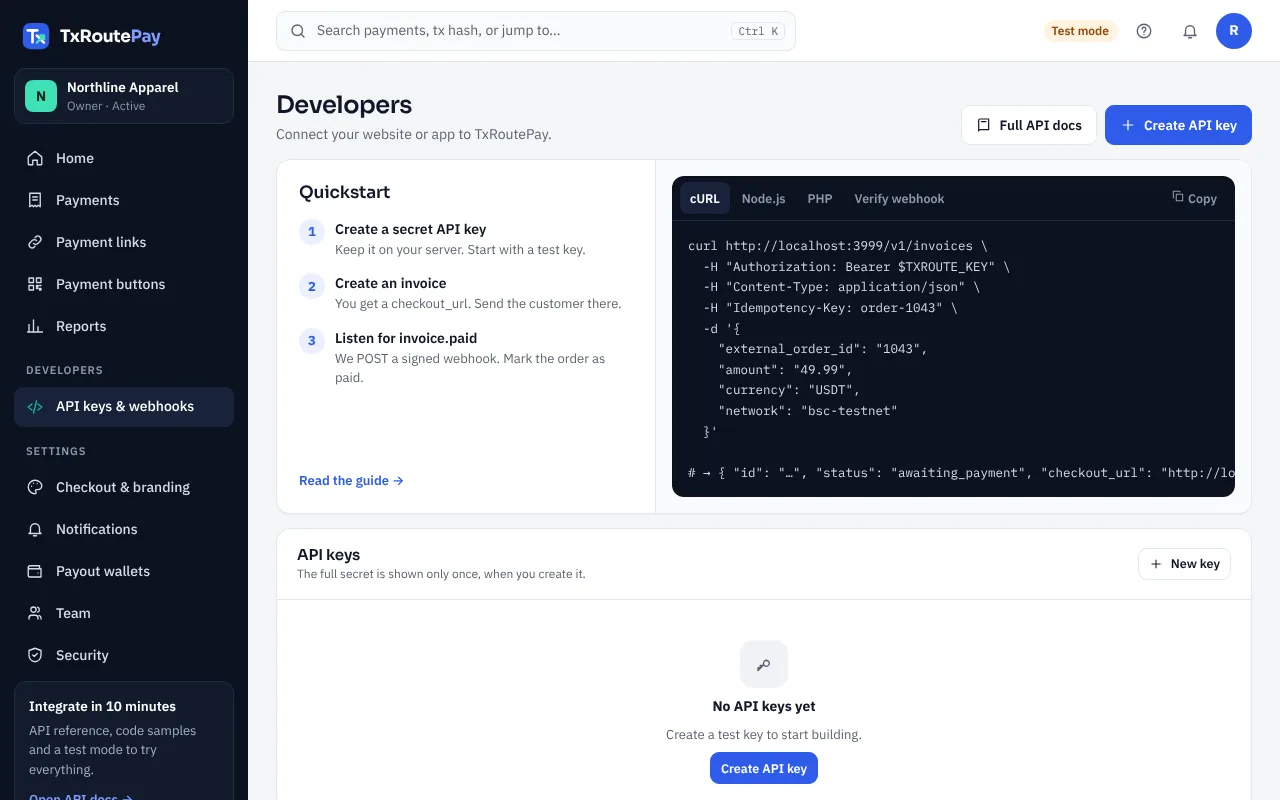
- Create a test API key in Developers.
- Create an invoice and redirect the customer to
checkout_url. - Add a webhook endpoint and mark the order paid on
invoice.paid.
const res = await fetch("https://txroutepay.com/v1/invoices", {
  method: "POST",
  headers: {
    authorization: `Bearer ${process.env.TXROUTE_KEY}`,
    "content-type": "application/json",
    "idempotency-key": "order-1043",
  },
  body: JSON.stringify({ external_order_id: "1043", amount: "49.99", currency: "USDT", network: "tron-mainnet" }),
});
const invoice = await res.json();
// redirect the customer to invoice.checkout_url
Authentication
Send your key in the Authorization header: Bearer pk_test_… or Bearer pk_live_…. Keys are shown once when created; we only store a hash.
Permissions (scopes)
invoices:writescope · optionalinvoices:readscope · optionalrefunds:writescope · optionalIP allowlist
Optionally restrict a key to your server IPs or CIDR ranges. Requests from other IPs get 401.
Test mode
Test keys only work with testnets: tron-nile and bsc-testnet. Live keys only work with tron-mainnet and bsc-mainnet. Test mode is available while your account is in review.
Set up your account (no code)
Everything a shop owner needs — no developer required.
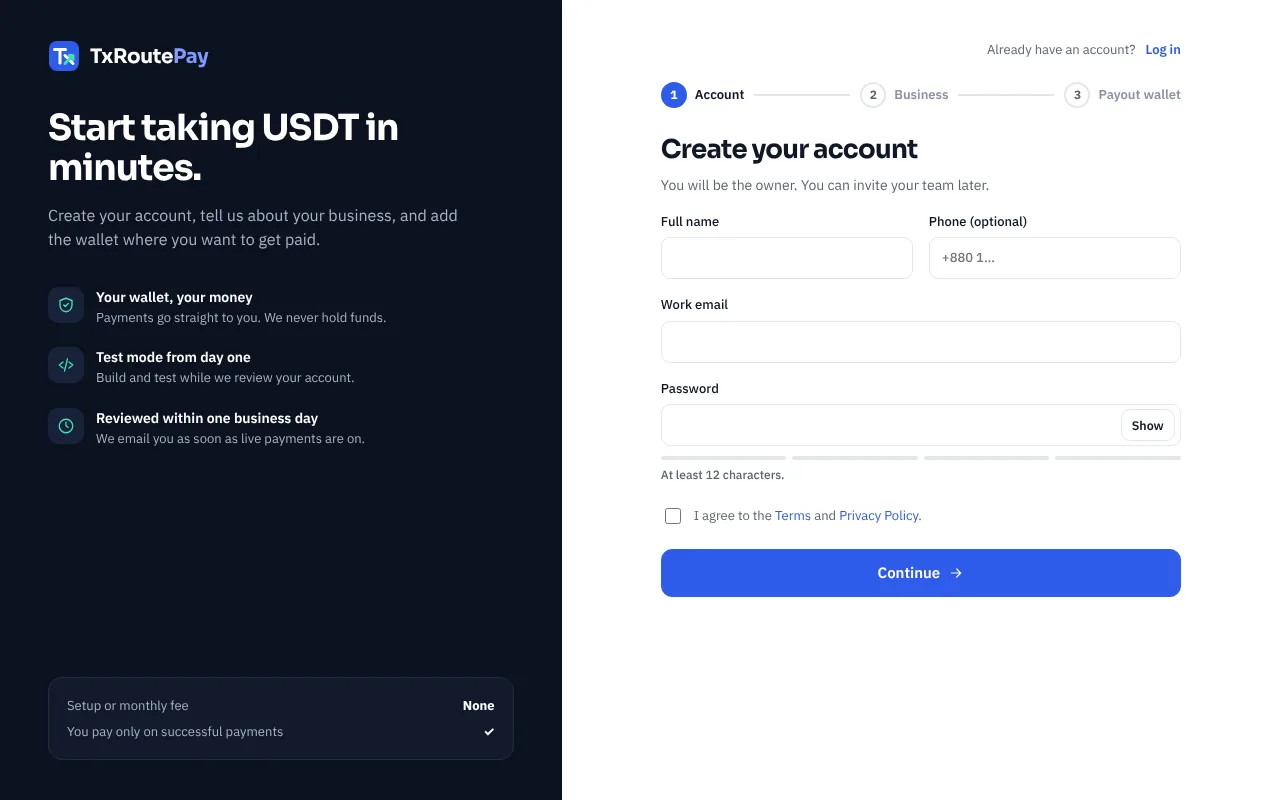
- Create your account. Go to txroutepay.com/portal/signup and enter your business name, website (or Facebook page) and what you sell. Our team reviews it, usually within one business day. You can use test mode while you wait.
Sign-up page - Add your payout wallet. Open Settings → Payout wallets. Paste a TRON address (starts with
T) for TRC20 and/or a BNB Smart Chain address (starts with0x) for BEP20. Payments go straight to these addresses.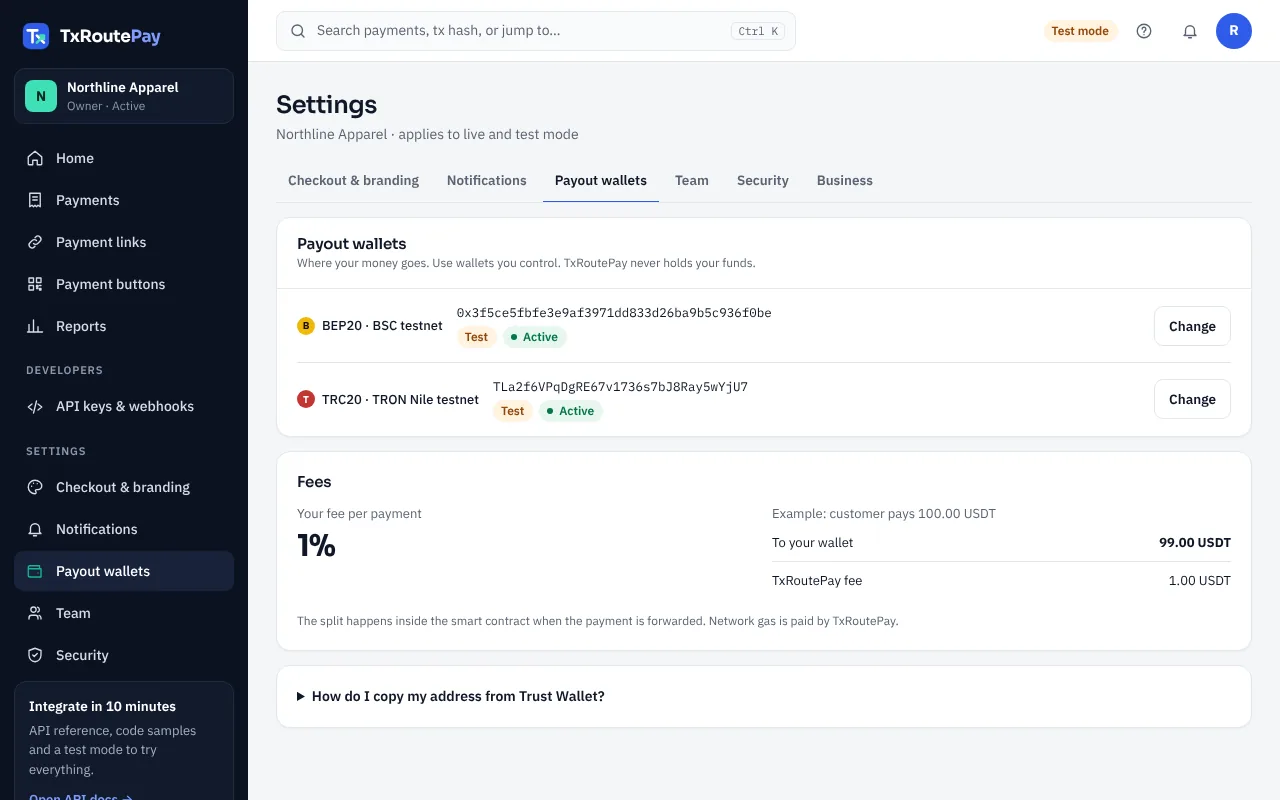
Settings → Payout wallets: one address per network - Turn on two-factor authentication for your login. Changing a payout wallet later needs 2FA, email approval and a 24-hour wait — this protects your money if someone gets your password.
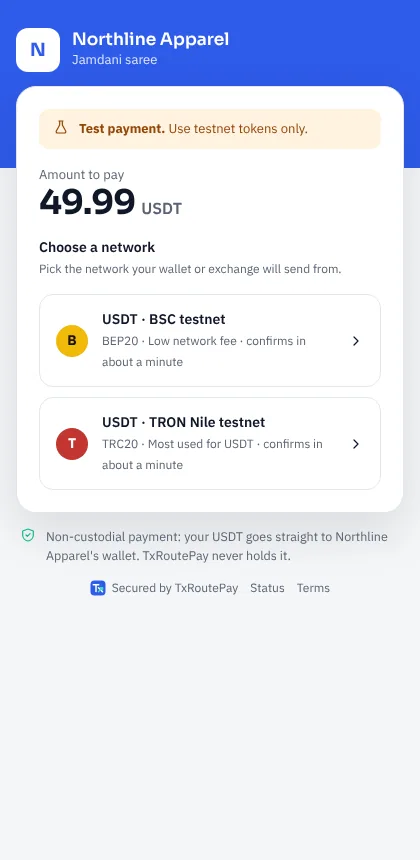
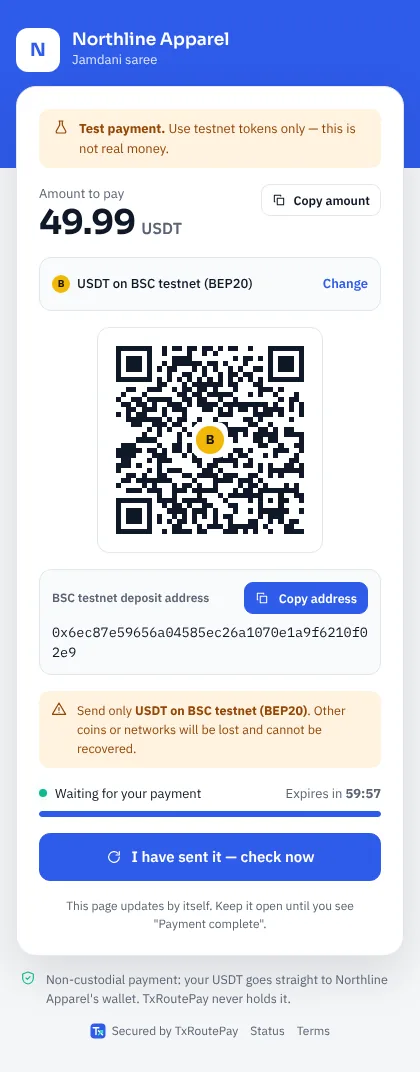
- Get paid with a link. Open Payments → New payment link, enter the amount and what it is for, then copy the link and send it on WhatsApp, Facebook or email. The customer picks TRC20 or BEP20, scans the QR code and pays.
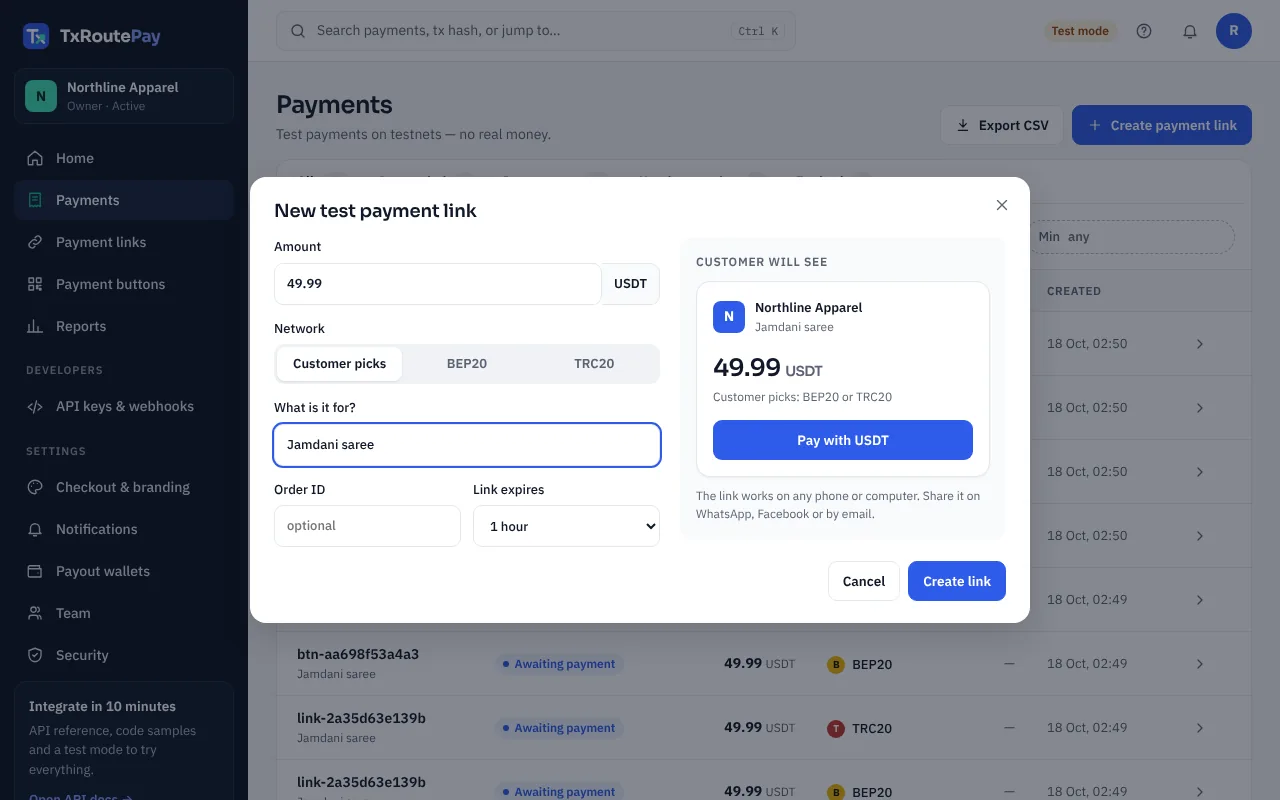
Payments → New payment link 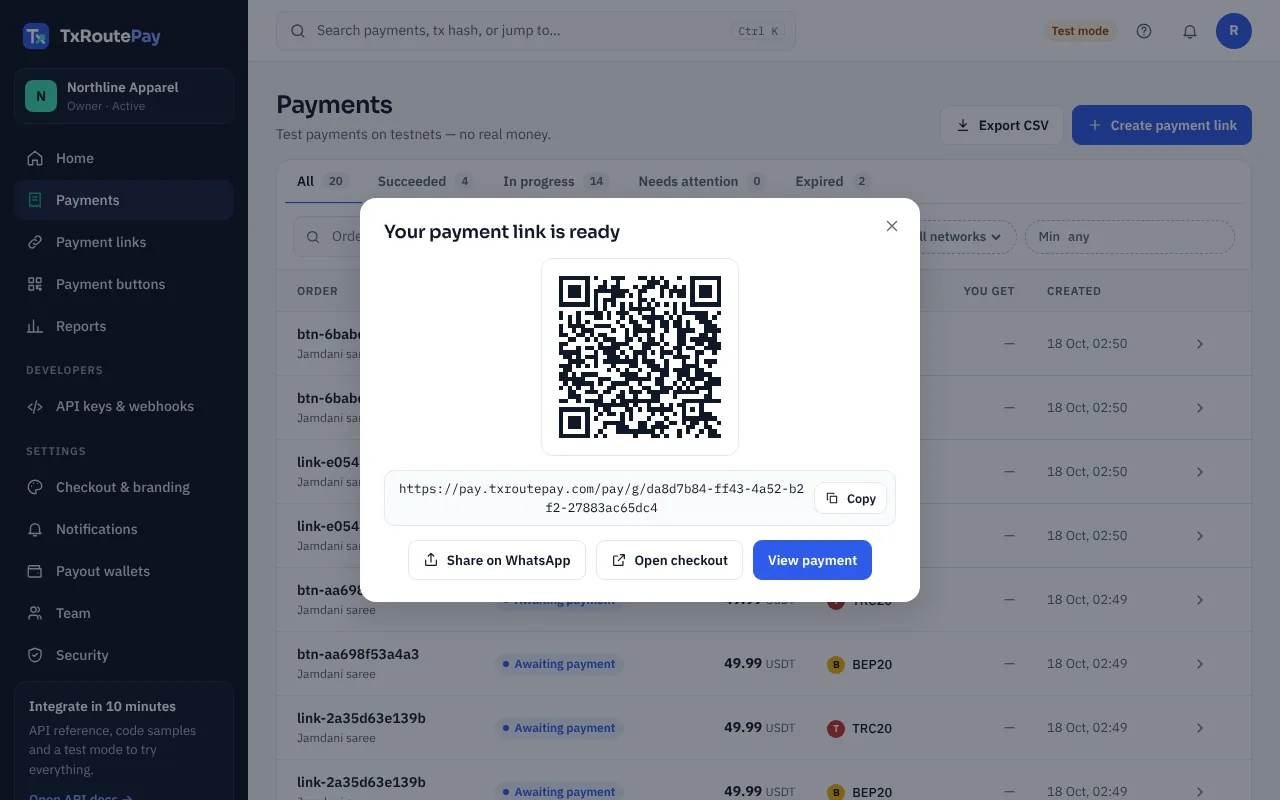
Your link is ready: copy it, share it on WhatsApp, or show the QR code - See the payment. The payment shows as Paid in your dashboard and the USDT is already in your wallet — there is nothing to withdraw. You also get an email.
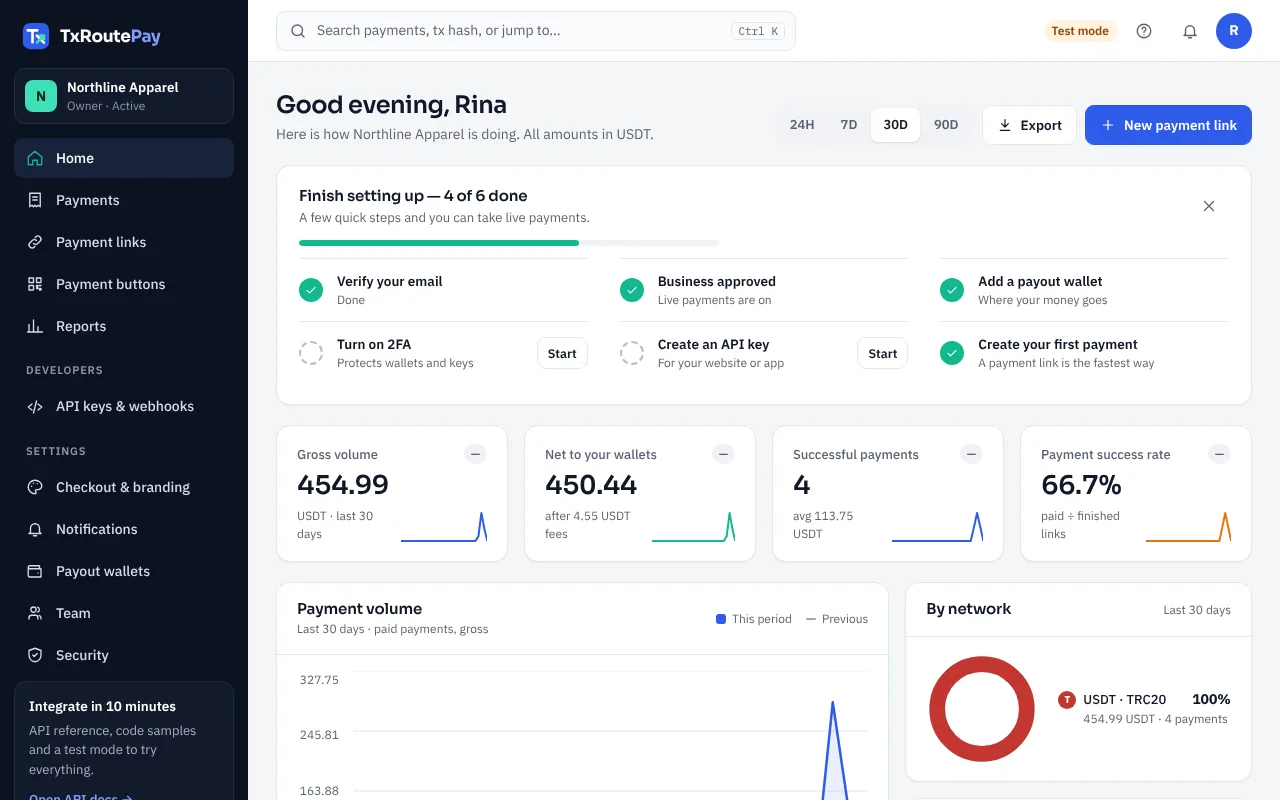
Home: volume, what reached your wallets, and setup progress
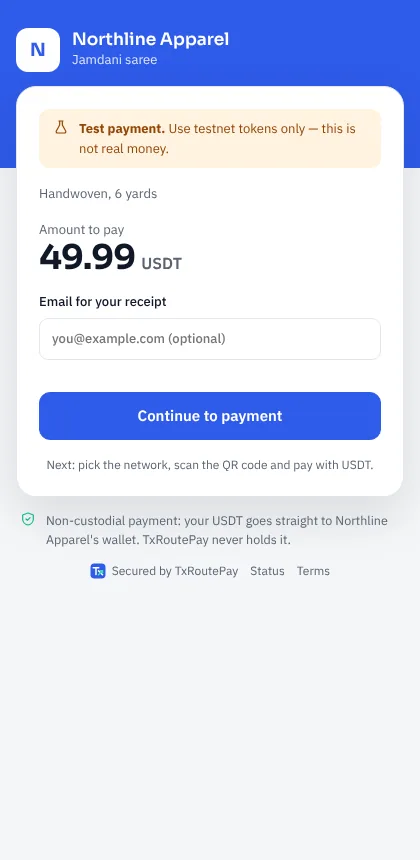
What your customer sees
Payment buttons (no code)
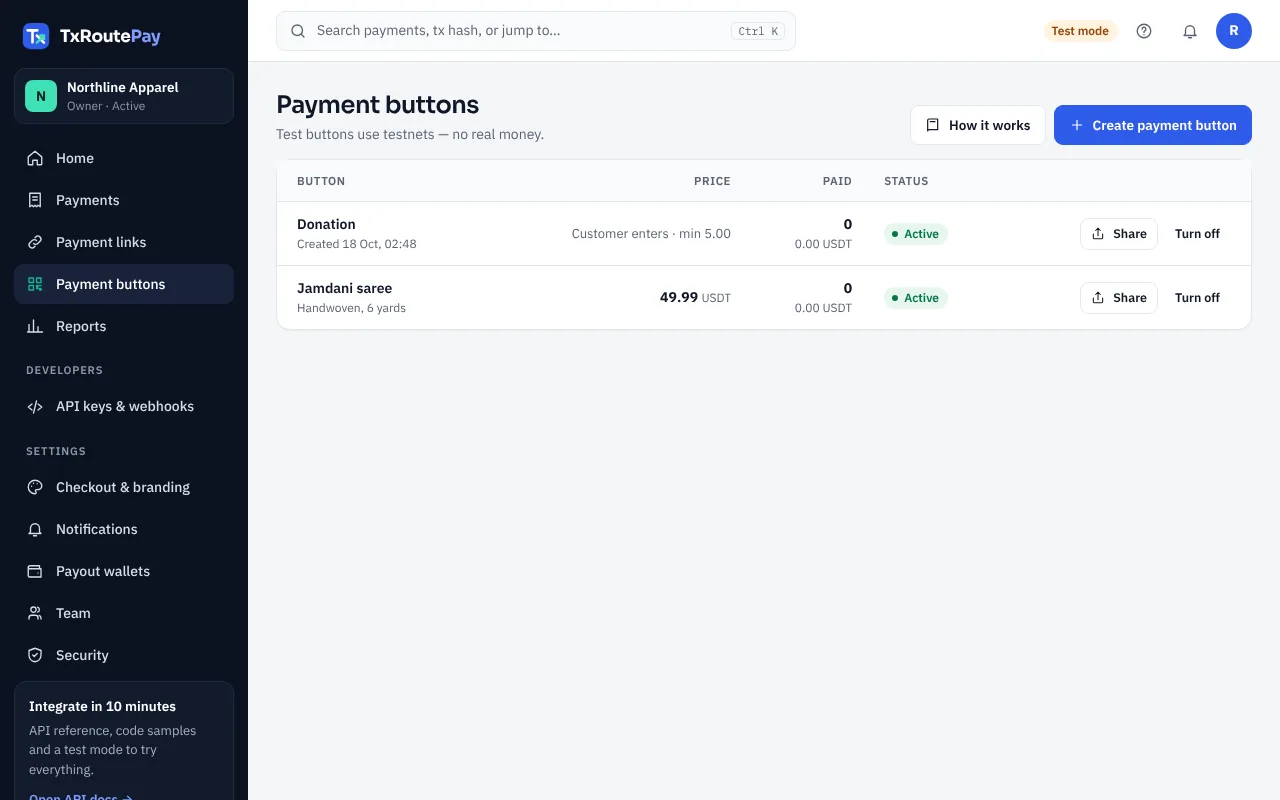
A payment button is one permanent link for a product, a service, a donation or a custom amount. Every customer who opens it gets their own payment, so you can post it once and use it for months.
- Open Payment buttons in the dashboard and press Create payment button.
- Enter what it is for and the price. Leave the price empty to let the customer type the amount (donations, tips, custom invoices) — you can set a minimum.
- Press Share. Copy the link, share it on WhatsApp, print the QR code, or copy the ready-made HTML button into your website builder (WordPress, Wix, Shopify, Blogger …).
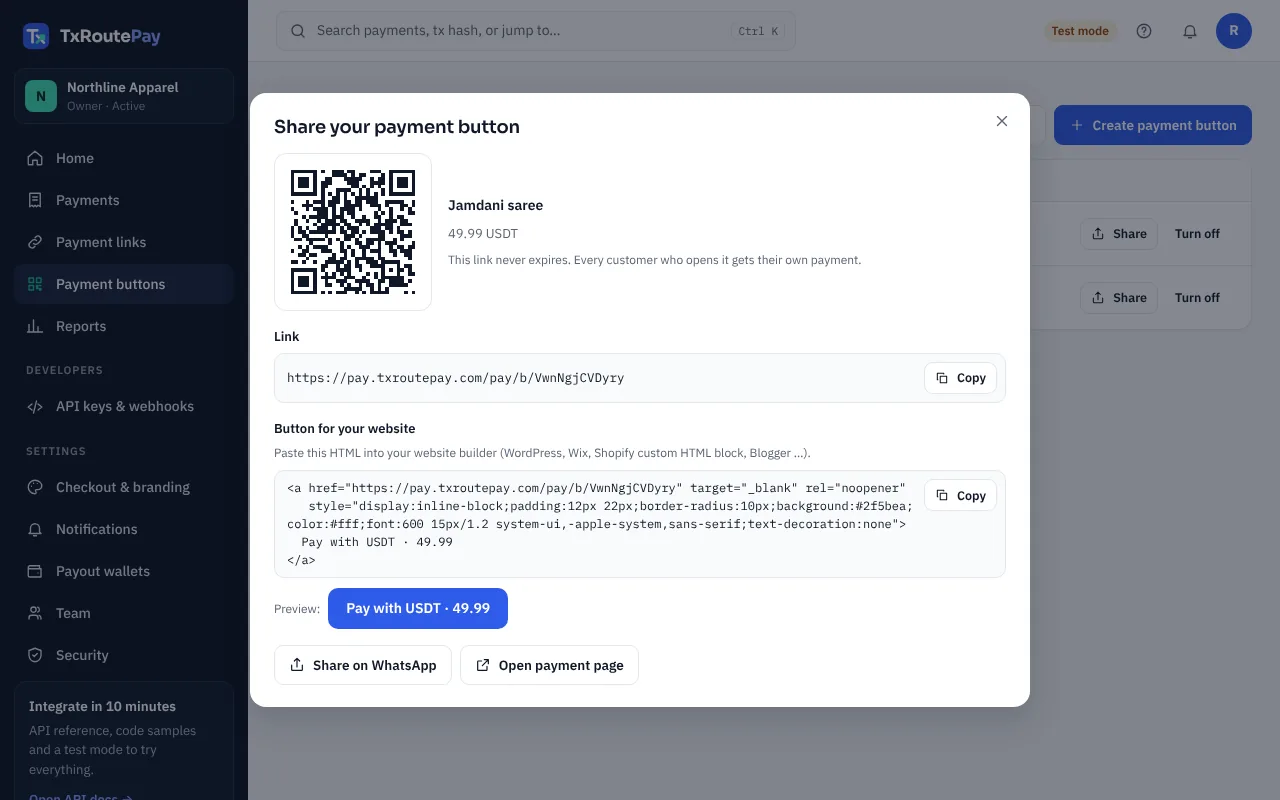
Share: link, QR code and a copy-paste HTML button - When a customer pays, the payment shows in Payments like any other, marked “Payment button”, and the USDT is already in your wallet.
What your customer sees
Accept payments on your website
For shops with their own website. The flow is the same in every language:
- The customer clicks Pay with USDT on your site.
- Your server creates an invoice with your secret API key and saves the invoice
idwith the order. - Your server redirects the customer to the invoice
checkout_url. They pay there. - We send a signed webhook to your server. You check the signature, fetch the invoice from the API and mark the order paid.
Checklist before going live
- Test everything first with a
pk_test_key ontron-nile/bsc-testnet, then switch to apk_live_key andtron-mainnet/bsc-mainnet. - Keep the API key and webhook secret on the server (environment variables). Never in HTML or JavaScript sent to the browser.
- Always verify the
X-Gateway-Signatureheader, then re-fetch the invoice — trust the API, not the browser redirect. - Treat
paid,overpaidandpaid_lateas paid. Make "mark order paid" safe to run twice (webhooks can repeat). - Answer the webhook with
200within 10 seconds; do slow work afterwards.
PHP example
Works on any PHP 7.4+ host with cURL (most shared hosting). Two files: one starts the payment, one receives the webhook.
pay-usdt.php
<?php
// pay-usdt.php — your server creates the invoice, then sends the customer to the checkout.
$apiKey  = getenv('TXROUTEPAY_KEY');            // pk_live_… (never put it in the page)
$orderId = $_GET['order'];                       // your own order id
$order   = load_order($orderId);                 // your code: read the order from your database
$network = ($_GET['network'] ?? 'trc20') === 'bep20' ? 'bsc-mainnet' : 'tron-mainnet';

$ch = curl_init('https://txroutepay.com/v1/invoices');
curl_setopt_array($ch, [
  CURLOPT_POST => true,
  CURLOPT_RETURNTRANSFER => true,
  CURLOPT_HTTPHEADER => [
    "Authorization: Bearer $apiKey",
    'Content-Type: application/json',
    "Idempotency-Key: order-$orderId-$network",
  ],
  CURLOPT_POSTFIELDS => json_encode([
    'external_order_id' => "$orderId-$network",
    'amount'   => number_format($order['total'], 2, '.', ''),   // "49.99"
    'currency' => 'USDT',
    'network'  => $network,
    'metadata' => ['description' => "Order #$orderId", 'customer_email' => $order['email']],
  ]),
]);
$invoice = json_decode(curl_exec($ch), true);
if (curl_getinfo($ch, CURLINFO_HTTP_CODE) >= 300) { http_response_code(502); exit('Payment could not be started'); }

save_invoice_id($orderId, $invoice['id']);       // your code: remember which invoice belongs to the order
header('Location: ' . $invoice['checkout_url']);
txroutepay-webhook.php
<?php
// txroutepay-webhook.php — set this URL in Developers → Webhooks.
$secret = getenv('TXROUTEPAY_WEBHOOK_SECRET');   // whsec_…
$apiKey = getenv('TXROUTEPAY_KEY');
$raw    = file_get_contents('php://input');
$header = $_SERVER['HTTP_X_GATEWAY_SIGNATURE'] ?? '';

// 1. Check the signature: t=<unix>,v1=<hex>[,v1=<hex>]
$t = null; $sigs = [];
foreach (explode(',', $header) as $part) {
  [$k, $v] = array_pad(explode('=', $part, 2), 2, '');
  if ($k === 't') $t = $v;
  if ($k === 'v1') $sigs[] = $v;
}
$expected = hash_hmac('sha256', "$t.$raw", $secret);
$ok = $t && abs(time() - (int)$t) <= 300;
$ok = $ok && count(array_filter($sigs, fn($s) => hash_equals($expected, $s))) > 0;
if (!$ok) { http_response_code(400); exit('bad signature'); }

// 2. Read the event, then fetch the invoice from the API (the source of truth)
$event = json_decode($raw, true);
if (in_array($event['type'], ['invoice.paid', 'invoice.overpaid', 'invoice.paid_late'], true)) {
  $ch = curl_init('https://txroutepay.com/v1/invoices/' . urlencode($event['data']['invoice_id']));
  curl_setopt_array($ch, [CURLOPT_RETURNTRANSFER => true, CURLOPT_HTTPHEADER => ["Authorization: Bearer $apiKey"]]);
  $inv = json_decode(curl_exec($ch), true);

  if (in_array($inv['status'], ['paid', 'overpaid', 'paid_late'], true)) {
    mark_order_paid($inv['external_order_id'], $inv['amount_confirmed']);  // your code; make it safe to run twice
  }
}
http_response_code(200);                         // answer within 10 seconds
Node.js example
Node 18+ with Express. The webhook route uses express.raw so the signature is checked on the exact bytes we sent.
// npm install express
import express from "express";
import { createHmac, timingSafeEqual } from "node:crypto";

const API = "https://txroutepay.com/v1";
const KEY = process.env.TXROUTEPAY_KEY;                 // pk_live_…
const SECRET = process.env.TXROUTEPAY_WEBHOOK_SECRET;   // whsec_…
const PAID = ["paid", "overpaid", "paid_late"];
const app = express();

// 1. "Pay with USDT" → create the invoice on your server, redirect to the checkout
app.get("/pay-usdt", async (req, res) => {
  const order = await loadOrder(req.query.order);                     // your code
  const network = req.query.network === "bep20" ? "bsc-mainnet" : "tron-mainnet";
  const r = await fetch(`${API}/invoices`, {
    method: "POST",
    headers: { authorization: `Bearer ${KEY}`, "content-type": "application/json",
               "idempotency-key": `order-${order.id}-${network}` },
    body: JSON.stringify({ external_order_id: `${order.id}-${network}`, amount: order.total.toFixed(2),
                           currency: "USDT", network, metadata: { description: `Order #${order.id}` } }),
  });
  if (!r.ok) return res.status(502).send("Payment could not be started");
  const invoice = await r.json();
  await saveInvoiceId(order.id, invoice.id);                          // your code
  res.redirect(invoice.checkout_url);
});

// 2. Webhook: keep the raw body for the signature check
export function verify(raw, header, secret) {
  const parts = String(header).split(",").map((p) => p.split("="));
  const t = parts.find(([k]) => k === "t")?.[1];
  if (!t || Math.abs(Date.now() / 1000 - Number(t)) > 300) return false;
  const expected = createHmac("sha256", secret).update(`${t}.${raw}`).digest("hex");
  return parts.some(([k, v]) => k === "v1" && v?.length === expected.length
    && timingSafeEqual(Buffer.from(v), Buffer.from(expected)));
}

app.post("/webhooks/txroutepay", express.raw({ type: "application/json" }), async (req, res) => {
  const raw = req.body.toString("utf8");
  if (!verify(raw, req.get("x-gateway-signature"), SECRET)) return res.status(400).send("bad signature");
  const event = JSON.parse(raw);
  if (PAID.includes(event.type.replace("invoice.", ""))) {
    const inv = await (await fetch(`${API}/invoices/${event.data.invoice_id}`,
      { headers: { authorization: `Bearer ${KEY}` } })).json();     // the API is the source of truth
    if (PAID.includes(inv.status)) await markOrderPaid(inv.external_order_id, inv.amount_confirmed); // your code
  }
  res.sendStatus(200);
});

app.listen(3000);
Python example
Python 3.9+ with Flask and requests. The same logic works in Django or FastAPI.
# pip install flask requests
import hashlib, hmac, os, time
import requests
from flask import Flask, abort, redirect, request

API = "https://txroutepay.com/v1"
KEY = os.environ["TXROUTEPAY_KEY"]                    # pk_live_…
SECRET = os.environ["TXROUTEPAY_WEBHOOK_SECRET"]      # whsec_…
PAID = {"paid", "overpaid", "paid_late"}
app = Flask(__name__)

@app.get("/pay-usdt")
def pay_usdt():
    order = load_order(request.args["order"])                       # your code
    network = "bsc-mainnet" if request.args.get("network") == "bep20" else "tron-mainnet"
    r = requests.post(f"{API}/invoices", timeout=20,
        headers={"Authorization": f"Bearer {KEY}", "Idempotency-Key": f"order-{order['id']}-{network}"},
        json={"external_order_id": f"{order['id']}-{network}", "amount": f"{order['total']:.2f}",
              "currency": "USDT", "network": network, "metadata": {"description": f"Order #{order['id']}"}})
    if r.status_code >= 300:
        abort(502)
    invoice = r.json()
    save_invoice_id(order["id"], invoice["id"])                     # your code
    return redirect(invoice["checkout_url"])

def verify(raw: bytes, header: str, secret: str, tolerance: int = 300) -> bool:
    parts = [p.split("=", 1) for p in (header or "").split(",") if "=" in p]
    t = next((v for k, v in parts if k == "t"), None)
    if not t or abs(time.time() - int(t)) > tolerance:
        return False
    expected = hmac.new(secret.encode(), f"{t}.".encode() + raw, hashlib.sha256).hexdigest()
    return any(k == "v1" and hmac.compare_digest(v, expected) for k, v in parts)

@app.post("/webhooks/txroutepay")
def webhook():
    raw = request.get_data()
    if not verify(raw, request.headers.get("X-Gateway-Signature", ""), SECRET):
        abort(400)
    event = request.get_json()
    if event["type"].removeprefix("invoice.") in PAID:
        inv = requests.get(f"{API}/invoices/{event['data']['invoice_id']}", timeout=20,
                           headers={"Authorization": f"Bearer {KEY}"}).json()   # source of truth
        if inv["status"] in PAID:
            mark_order_paid(inv["external_order_id"], inv["amount_confirmed"])  # your code
    return "", 200
Payment links
No website? In the dashboard, open Payments → New payment link, enter the amount and a description, and share the link on WhatsApp, Facebook or email. The customer chooses the network on the checkout page.
Hosted checkout
Every invoice has a checkout_url. The page shows the amount, a QR code, the address with copy buttons, a countdown and live status, with your logo and brand color (Settings → Checkout & branding). Set a return URL to bring the customer back to your shop after payment.
Payment statuses
awaiting_paymentconfirmingpaidunderpaidoverpaidpaid_lateexpiredinvoice.paid webhook, or after fetching the invoice from your server.Create an invoice
Needs scope invoices:write. Returns 201 with the invoice (or 200 with the existing one when the same Idempotency-Key is reused).
Body parameters
external_order_idstring · requiredamountstring · required"49.99".currencystring · required"USDT" for now.networkstring · requiredtron-mainnet, bsc-mainnet (live) or tron-nile, bsc-testnet (test).expires_in_minutesinteger · optionalmetadataobject · optionaldescription is shown on the checkout; customer_email lets us send a receipt.Headers
Idempotency-Keyheader · optionalcurl https://txroutepay.com/v1/invoices \
-H "Authorization: Bearer pk_test_…" \
-H "Idempotency-Key: order-1043" \
-H "Content-Type: application/json" \
-d '{
"external_order_id": "1043",
"amount": "49.99",
"currency": "USDT",
"network": "tron-nile",
"expires_in_minutes": 60,
"metadata": { "description": "Jamdani saree", "customer_email": "rina@example.com" }
}'Response · 201
{
  "id": "6f1c2a4e-…",
  "external_order_id": "1043",
  "status": "awaiting_payment",
  "network": "tron-nile",
  "currency": "USDT",
  "address": "TQm1…7xLp",
  "amount": "49.99",
  "amount_detected": "0",
  "amount_confirmed": "0",
  "fee_bps": 100,
  "checkout_url": "https://pay.txroutepay.com/pay/6f1c2a4e-…",
  "expires_at": "2026-10-17T11:00:00.000Z",
  "paid_at": null,
  "created_at": "2026-10-17T10:00:00.000Z",
  "metadata": { "description": "Jamdani saree" }
}
Retrieve an invoice
Needs invoices:read. Returns the invoice object above with its current status.
List invoices
statusquery · optionalnetworkquery · optionallimitquery · optionalbeforequery · optionalnext_cursor from the previous page.Returns { "data": [ … ], "next_cursor": "…" | null }, newest first.
Record a refund
Needs refunds:write. Crypto payments cannot be pulled back, so you send the refund from your own wallet, then record it here so reports and receipts stay correct. Only paid invoices can be refunded, and the total can’t exceed the amount received.
amountstring · requiredreasonstring · requiredtx_hashstring · optionalnotestring · optionalemail_customerstring · optionalcurl https://txroutepay.com/v1/invoices/6f1c2a4e-…/refunds \
-H "Authorization: Bearer pk_live_…" \
-H "Content-Type: application/json" \
-d '{ "amount": "10.00", "reason": "Item out of stock", "tx_hash": "0x…", "email_customer": "rina@example.com" }'Errors
Errors return JSON: { "error": "code", "message": "…" }.
400 invalid_requestdetails lists each problem.400 invalid_amount400 unsupported_network400 wrong_mode400 wallet_not_configured401 unauthorized403 forbidden403 missing_permission404 not_found409 duplicate_orderexternal_order_id already exists (use an Idempotency-Key to retry safely).503 network_not_readyWebhook events
Add endpoints in Developers → Webhooks. We POST JSON to your URL for each event:
{
  "id": "evt_…",
  "type": "invoice.paid",
  "created_at": "2026-10-17T10:03:12.000Z",
  "data": {
    "invoice_id": "6f1c2a4e-…",
    "status": "paid",
    "amount_expected_base_units": "49990000",
    "amount_confirmed_base_units": "49990000",
    "tx_hash": "a91e…"
  }
}invoice.createdinvoice.payment_detectedinvoice.paidinvoice.underpaidinvoice.overpaidinvoice.paid_lateinvoice.expiredinvoice.payment_reorgedtest.pingAmounts in webhooks are in the token’s smallest unit (USDT has 6 decimals on TRON and 18 on BSC). The easiest way: call Retrieve an invoice with data.invoice_id and use its decimal amount_confirmed and external_order_id.
Use the X-Gateway-Event-Id header (same as id) to ignore duplicates.
Verify signatures
Every request has X-Gateway-Signature: t=<unix time>,v1=<hex>. v1 is HMAC-SHA256 of t + "." + raw body with your endpoint secret (whsec_…). For 24 hours after you rotate a secret, a second v1 signed with the old secret is included — accept the request if any v1 matches.
import { createHmac, timingSafeEqual } from "node:crypto";

// Header "X-Gateway-Signature: t=<unix>,v1=<hex>[,v1=<hex>]"
export function verify(rawBody, header, secret) {
  const parts = header.split(",").map((p) => p.split("="));
  const t = parts.find(([k]) => k === "t")?.[1];
  if (!t || Math.abs(Date.now() / 1000 - Number(t)) > 300) return false; // 5 min replay window
  const expected = createHmac("sha256", secret).update(`${t}.${rawBody}`).digest("hex");
  return parts.some(([k, v]) => k === "v1" && v.length === expected.length
    && timingSafeEqual(Buffer.from(v), Buffer.from(expected)));
}
Retries
Answer with any 2xx within 10 seconds. Otherwise we retry after 10 s, 30 s, 2 min, 10 min, 30 min, 1 h, 3 h, 6 h, 12 h and 24 h, then give up and show the delivery as failed in your dashboard (you can resend it there).
WooCommerce plugin
For WordPress shops. Customers pick USDT at checkout, pay on our page, and the order is marked paid automatically. Works with the classic checkout and the new Checkout block.
- In WordPress open Plugins → Add New → Upload Plugin, choose the zip and press Activate.
- Open WooCommerce → Settings → Payments → TxRoutePay (USDT).
- In the TxRoutePay dashboard open Developers, create an API key and paste it into the plugin (
pk_test_…to try it,pk_live_…for real money). - Copy the Webhook URL shown in the plugin settings. In Developers → Webhooks add that URL, then paste the signing secret (
whsec_…) back into the plugin. - Choose TRC20, BEP20 or both, enable the gateway and save. Place a test order to check everything.
What happens to orders
Pending paymentProcessingOn holdCancelledOther platforms (Shopify, Laravel, custom PHP …) can use the PHP, Node.js or Python examples, or a payment button.